See tight spots ahead
Explore daily balance graphs over 30, 90 or 180 days. See your payday outlook and where your projected balance falls below zero or your chosen buffer.
 Sub-Tracked
A LITTLE CLARITY FOR EVERY PAYDAY
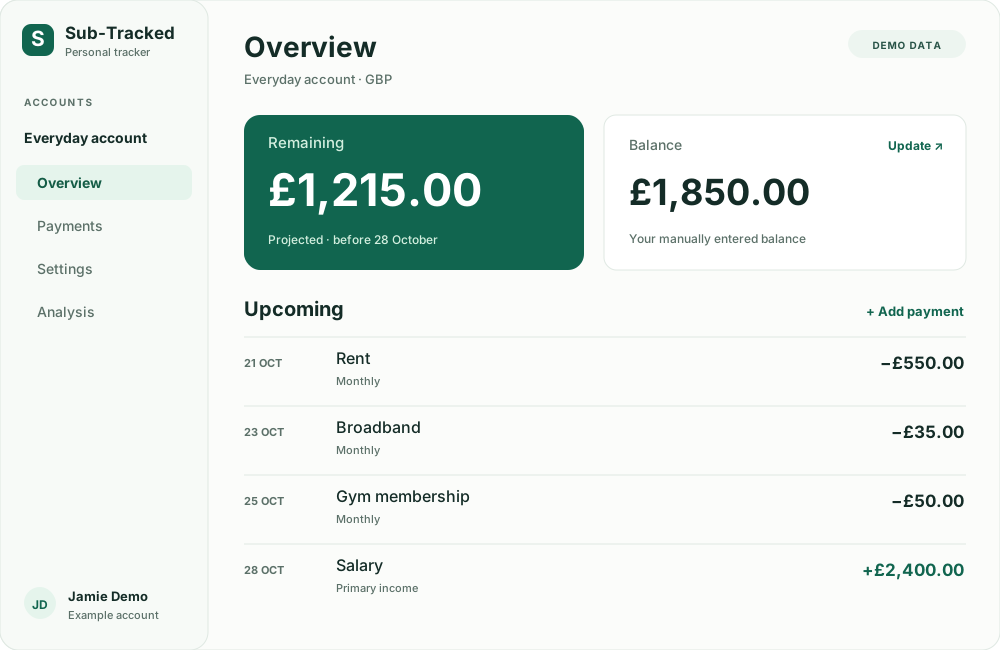
A balance tells you what’s there. Sub-Tracked helps you see what’s coming. Track recurring payments and work out what’s projected to remain before payday.
Free manual tracking · GBP & USD · No bank connection needed
Know your next payment
Keep dates and amounts in one place.
Look beyond your balance
Account for the bills still to come.
Stay in control of your entries
Update your plans when life changes.
A place for the moving parts
Rent on the 21st. Broadband on the 23rd. Payday on the 28th. Bring the dates together with a subscription and bill tracker that shows how your schedule fits around your income.
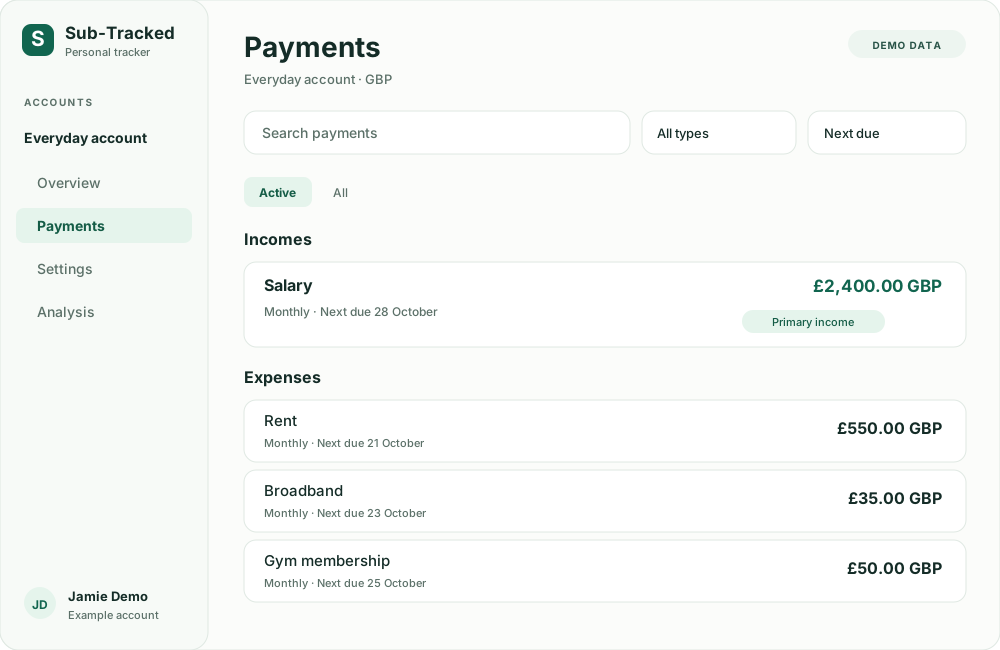
From a yearly renewal to a weekly payday, give every recurring payment a schedule. Search by name, filter income and expenses, or sort by what’s due next.
Open Analysis for a six-month view of scheduled income, expenses and projected month-end balances. Bring annual bills and future schedule changes into your planning before their dates arrive.
A forecast is only as current as your entries. It includes scheduled activity, not unscheduled spending or confirmed bank transactions.
Build your own outlook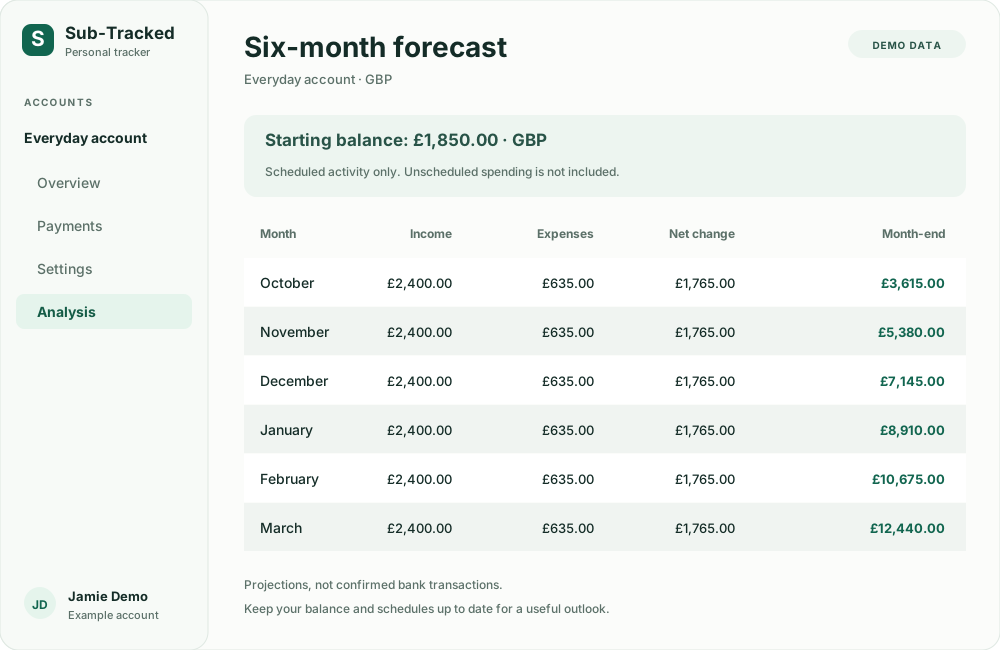
Sub-Tracked Plus
Look beyond the next payment. Explore your daily outlook, compare a change, and give those bigger yearly bills a plan of their own.
Compare free tracking and Plus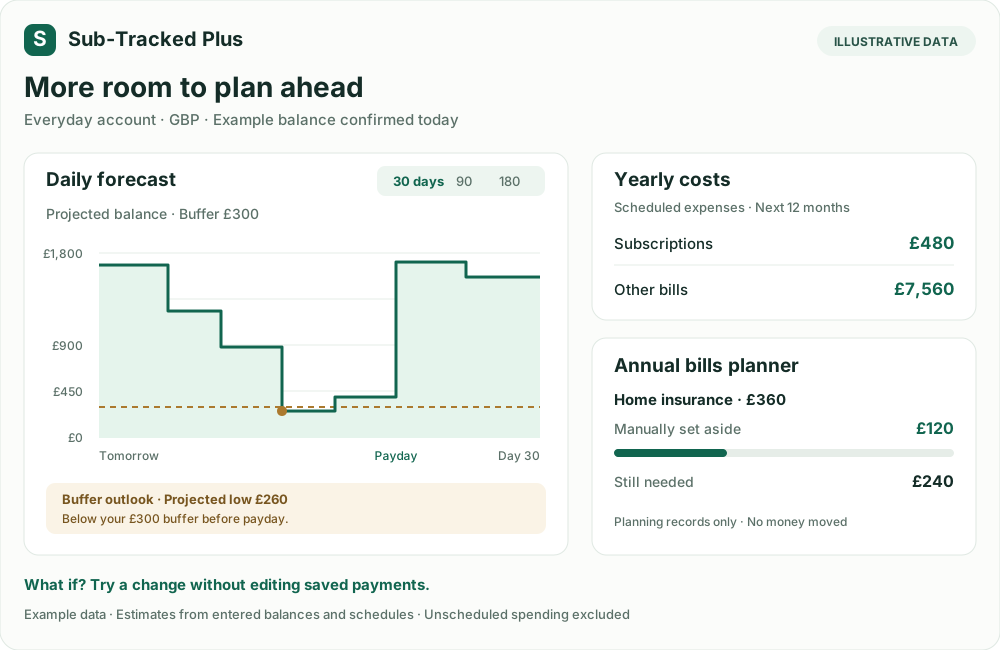
Explore daily balance graphs over 30, 90 or 180 days. See your payday outlook and where your projected balance falls below zero or your chosen buffer.
Explore what happens if you skip an expense, change an amount or move a date. Temporary scenarios leave your saved schedules intact.
See what subscriptions and other bills add up to over the next 12 months. Group your expenses and find the largest scheduled costs.
See upcoming yearly bills, record what you have set aside, and estimate contributions per payday or month. Set-aside records do not move money.
Choose the alerts that help you. Get in-app shortfall and buffer warnings, with optional email alerts. Emails are off by default and require a verified email. Keep your balance current and schedules valid for a useful warning.
Every outlook is an estimate based on your entered balance and schedules. Unscheduled spending is excluded. Scenarios do not change saved payments or cancel external subscriptions.
From a list in your head to a plan on screen
Create a GBP or USD account and enter its current balance. Give it a name that makes sense to you, like Everyday or Household.
Add your salary, rent, bills and subscriptions. Set their dates and repeat schedules, then mark your regular pay as primary income.
Check what’s due before payday, review the longer forecast, and update your balance as everyday spending changes it.
Skip one occurrence, move its date or change its amount. Set a future price change while keeping earlier projected occurrences intact.
Keep household bills and personal spending in separate accounts. Choose GBP or USD and an account time zone for each schedule.
Use the dashboard on your phone or desktop. Choose light or dark mode, then pick up your planning in the appearance you prefer.
Free tracking. Optional Plus planning.
Your accounts, payment schedules and six-month forecast stay free. Plus adds more ways to explore and prepare.
£0
A place for your balances and the payments you know are coming.
£2.99/ month
or £29.99 / year · billed in GBP
One Plus subscription covers every account under your login.
Start with free tracking and explore Plus in your dashboard.
Before you get started
How tracking works, what the numbers mean, and what you can make your own.
Visit supportSub-Tracked is a personal account, income and recurring-expense tracker. It brings your manually entered balances, subscriptions, bills and income schedules together so you can see upcoming payments and projected balances.
No. You enter your account balances and payment schedules yourself. Sub-Tracked does not connect to your bank, import bank transactions or move money. Update your balance whenever you want your projections to reflect recent spending.
Remaining starts from the balance you entered and applies scheduled income and expenses from tomorrow up to, but not including, your next primary-income date. If there is no future primary payday, it projects to month-end. Your balance is assumed to already include today’s activity. Unscheduled spending is not included.
Yes. You can add one-off payments, monthly and yearly schedules, weekly or fortnightly payments, payments every four weeks, and custom intervals in days. Track income as well as expenses, including salary, rent, utilities and memberships.
You can edit a payment, pause its schedule, or set an end date. For a single occurrence, you can skip it, move its date or override its amount. You can also schedule a future change to an amount or recurrence while preserving earlier projected occurrences.
Yes. Create separate accounts in GBP or USD, with balances and payment schedules for each. Each account has its own time zone. Amounts stay in the account’s currency; Sub-Tracked does not combine currencies or perform currency conversion.
The forecast lists scheduled income, scheduled expenses, net change and a projected month-end balance for six months. The first month includes only the remaining days. It is based on your entered balance and schedules, not confirmed transactions, and it does not include spending you have not scheduled.
For £2.99 per month or £29.99 per year in GBP, Plus adds daily forecast graphs, payday shortfall and buffer outlooks, temporary what-if scenarios, yearly cost breakdowns, an annual bills planner and configurable alerts. One Plus subscription covers every account under your login. Tracking a USD account does not change the Plus billing currency. Your existing tracking and six-month forecast stay free.
No. Scenarios temporarily change the projection so you can compare possibilities. They do not edit your saved payment schedules or cancel subscriptions with external providers. Make any lasting schedule changes in Payments, and manage external subscriptions with their providers.
No. You manually record amounts you have set aside for upcoming yearly bills. The planner shows what is still needed and suggests contributions per payday, or per month when no primary income is set. These records do not move money, reduce your saved balance or confirm that a contribution is affordable.
Choose shortfall or buffer warnings and a 7, 14 or 30-day look-ahead for each account. Optional email alerts are off by default and require a verified email. Financial warnings depend on a balance confirmed today and valid schedules; otherwise you are prompted to update your balance or review your entries. Alerts cannot account for unscheduled spending.
Yes. The dashboard adapts to mobile screens, with account navigation and slide-up forms for adding or editing payments. You can also switch between light and dark mode using the sun or moon button beside the sidebar title.
Your next payday, with a little more perspective
Start with one account, your current balance and the payments you know are coming. Build the rest as you go.
Start tracking your paymentsAlready tracking? Log in to your dashboard